Root Calculator

Determine square roots, cube roots, or nth roots quickly wit our tool.

Square Root
Cube Root
General Root
4

Was this calculator helpful?

4.7/5 (19 votes)

Calculation Examples

Calculation Case Result
Square root of 144 12
Cube root of 27 3
4th root of 625 5

How to Use Root Calculator?

The root calculator performs calculations for square roots, cube roots, and higher-order roots through simple entry. First, select a root type from the list such as the square root, cube root, or the nth root calculator for a custom index. Then you may enter the number for which you would like to determine the root, keeping in mind that it should be consistent with the root function you selected.

For example, to calculate the square root of 16, you would simply enter 16 under the square root heading. The units remain standard for numerical entry, and does not require you to convert the entry unless specified. After entering the appropriate number, simply press the calculate button, and you will see the results which include the root, the exact root value, and the approximated root, if applicable. This process is similar for calculating cube roots; if you enter 27 you will see the answer as 3, as well as in the case for the nth root; for example, the fourth root of 81.

The root calculator is designed for primarily positive real numbers and will signal in the case of a complex root. The calculator features the option to calculate and display an answer in decimal form to the desired degree of precision for educational uses in practical applications.

Understanding Root Calculations

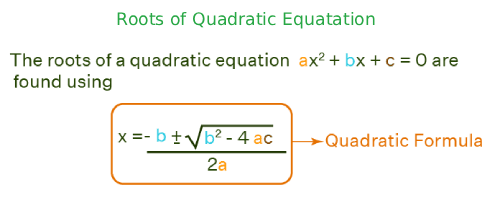
Root calculations draw on exponentiation rules, where the square root of a number $x$ is written $x^{1/2}$, cube root $x^{1/3}$, and nth root $x^{1/n}$. These are derived from equations that solve for $y$ in the form of $y^n = x$. When dealing with perfect roots, the results are integers; however, most roots are irrational and require numerical methods, such as the Newton-Raphson method: $x_{n+1} = x_n - \frac{f(x_n)}{f'(x_n)}$, to converge on a precise decimal result.Roots of Quadratic Equatation

Useful Tips 💡

  • Input positive values for real root outputs; note complex for negatives.
  • Adjust decimal places in settings for tailored precision in results.

📋Steps to Calculate

  1. Select root type (square, cube, or nth).

  2. Enter the number to compute.

  3. Click calculate for instant root result.

Mistakes to Avoid ⚠️

  1. Thinking $\sqrt{-x}$ has no real solution - but cube roots ($\sqrt[3]{-x}$) do.
  2. Using $x^{1/n}$ instead of the nth root button and getting wrong precision.
  3. Forgetting that even roots of negative numbers are not real.
  4. Confusing root with exponent: $\sqrt[4]{16} = 2$, not $4$.

Practical Applications📊

  1. Verify square roots in geometry problems for area computations.

  2. Assess cube roots in volume calculations for three-dimensional shapes.

  3. Explore nth roots in algebra to solve polynomial equations accurately.

Questions and Answers

What is a root calculator and what mathematical problems can it solve?

A root calculator is a high-precision tool used for computing square roots, cube roots, and higher-order "nth" roots of any given number (the radicand). Whether you are finding the exact result for a perfect square like $\sqrt{16}=4$ or approximating an irrational value like $\sqrt{2}$, the tool provides the accuracy needed for advanced algebra, geometry, and physics simulations.

How do you calculate a square root manually versus using a tool?

To find a square root, you are essentially solving for $y$ in the equation $y^2 = x$. While simple roots can be memorized, non-perfect squares like $\sqrt{8}$ (which simplifies to $2\sqrt{2}$) require complex iterative methods. Our root calculator employs algorithms like the Newton-Raphson method to provide rapid, precise approximations for daily mathematical tasks or engineering estimates.

What are the primary uses for a cube root calculator?

A cube root calculator identifies the number that, when multiplied by itself three times, yields the input ($y^3 = x$). This is essential for calculating the volume of three-dimensional shapes, solving cubic polynomial equations in algebra, and understanding spatial relationships in architectural design or manufacturing.

How to find the nth root of a large number efficiently?

To find an "nth" root, you must define the root index ($n$). The calculator then computes the value as $x^{1/n}$. This is particularly useful for higher-order mathematics, such as finding the fourth or fifth roots in geometric progressions. The tool manages large integers effectively, delivering decimal results with adjustable precision for scientific computations.

Does the root calculator handle negative numbers and imaginary results?

Yes. While real numbers do not have even roots of negatives, the square root of a negative number (e.g., $\sqrt{-9}$) results in an "imaginary unit" ($3i$). Our full root calculator identifies these complex cases, helping students transition from basic arithmetic to advanced complex analysis used in electrical engineering and theoretical physics.

What formulas and standards underpin the Root Calculator?

The tool utilizes fundamental exponentiation: $\sqrt{x} = x^{1/2}$, $\sqrt[3]{x} = x^{1/3}$, and the general $\sqrt[n]{x} = x^{1/n}$. These principles for solving radical equations are verified by the American Mathematical Society, ensuring that the CalcMate results meet the highest academic standards for geometric and algebraic accuracy.
Disclaimer: This calculator is designed to provide helpful estimates for informational purposes. While we strive for accuracy, financial (or medical) results can vary based on local laws and individual circumstances. We recommend consulting with a professional advisor for critical decisions.