Circle Calculator
Solve for Circle Area, Circumference, Radius, and Diameter
Calculation Examples

How to Use the Circle Calculator
Enter any one known property of the circle: radius, diameter, area, or circumference. Select your preferred unit of measurement (centimeters, meters, inches, or feet) and click "Calculate."
The tool instantly computes all remaining properties using standard Euclidean geometry formulas. This is useful for geometry coursework, engineering design involving circular components, and material estimation for circular projects such as pipes, wheels, garden plots, or architectural arches.
How Calculations Are Performed
All circle properties derive from a single measurement through four fundamental formulas of Euclidean geometry. Area: $A = \pi r^2$. Circumference: $C = 2\pi r = \pi d$. Radius from area: $r = \sqrt{A/\pi}$. Radius from circumference: $r = C/(2\pi)$. Diameter: $d = 2r$. The calculator uses the full precision value of $\pi$ (approximately 3.14159265358979) rather than a rounded approximation, which prevents the cumulative errors that arise in large-scale engineering when $\pi$ is shortened to 3.14 or 3. Because all four properties are mathematically interrelated, entering any single value uniquely determines all others.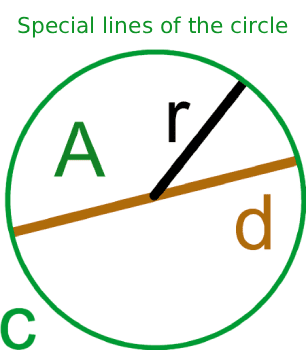
Useful Tips 💡
- If you can only measure around the outside of a circular object (such as a pipe or tree trunk), enter that measurement as the circumference and the calculator will derive the radius and diameter for you.
- Always verify which measurement you have before entering it. Entering a diameter value into the radius field will produce an area four times larger than the correct answer, since area scales with the square of the radius.
📋Steps to Calculate
-
Enter one known value: radius, diameter, area, or circumference.
-
Select the unit of measurement (meters, centimeters, inches, or feet).
-
Click "Calculate" to instantly receive all four circle properties.
Mistakes to Avoid ⚠️
- Entering the diameter instead of the radius in the area formula. Since $A = \pi r^2$, using the diameter value produces a result four times too large because the error is squared.
- Inconsistent units: entering the radius in inches but expecting the area in square centimeters without unit conversion. Area units are the square of the length unit, so a radius in inches gives area in square inches, not square centimeters.
- Rounding pi prematurely in manual calculations. Using 3 instead of 3.14159 introduces a 4.5% error; for a circle of radius 10 meters, this misestimates the area by over 14 square meters.
Practical Applications📊
Calculate the area or circumference of circular components in engineering and manufacturing, such as pipe cross-sections, gear blanks, or wheel rims.
Determine material quantities for circular garden beds, paving, or landscaping projects where area governs the amount of soil, gravel, or turf required.
Solve geometry problems involving circles in academic coursework, from basic area and perimeter calculations to problems requiring derived values like sector area or arc length.