Volume Calculator
Calculate Volume of Any Shape Using Standard Geometric Formulas
Calculation Examples

How to Use the Volume Calculator
Select the shape you want to calculate from the menu (cylinder, cube, sphere, cone, or rectangular prism), then enter the required dimensions. For a cylinder, enter radius and height. For a cube, enter the side length. For a rectangular prism, enter length, width, and height. For a sphere, enter the radius. For a cone, enter the base radius and height.
Select your preferred unit (meters, centimeters, inches, or feet) and click "Calculate." The result is expressed in cubic units and, where applicable, also converted to liters or gallons for practical reference.
Volume Formulas Explained
Each shape has a dedicated formula derived from integral calculus applied to its geometry. Cylinder: \(V = \pi r^2 h\), where \(r\) is the base radius and \(h\) is height. Cube: \(V = s^3\), where \(s\) is the side length. Rectangular prism: \(V = l \times w \times h\). Sphere: \(V = \dfrac{4}{3}\pi r^3\). Cone: \(V = \dfrac{1}{3}\pi r^2 h\), which equals exactly one third of the volume of a cylinder with the same base and height. A key relationship worth noting: a sphere with radius \(r\) has exactly two thirds of the volume of the smallest cylinder that contains it (\(V_{cylinder} = \pi r^2 \times 2r = 2\pi r^3\), \(V_{sphere} = \dfrac{4}{3}\pi r^3\)), a result Archimedes considered his greatest discovery. The calculator applies the full precision value of \(\pi\) in all relevant formulas.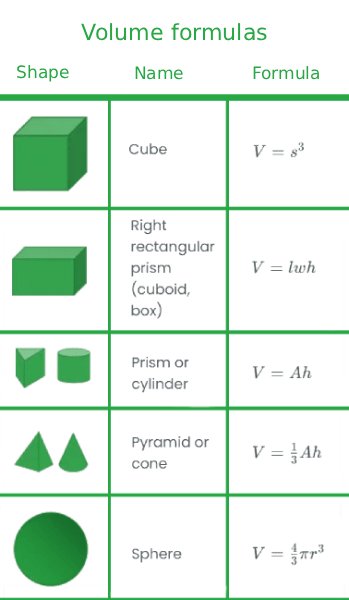
Useful Tips 💡
- For cylinders and spheres, always enter the radius (half the diameter), not the full diameter. Entering the diameter produces a result four times too large for a cylinder and eight times too large for a sphere.
- Convert units to a single system before entering dimensions. If mixing centimeters and meters, the result will be in an inconsistent unit that cannot be directly used without further conversion.
📋Steps to Calculate
-
Select the shape from the dropdown menu.
-
Enter the required dimensions (radius, height, side length, or length, width, and height).
-
Select the unit of measurement and click "Calculate" to receive volume in cubic units and liters.
Mistakes to Avoid ⚠️
- Entering the diameter instead of the radius for cylinders and spheres. Since radius appears squared or cubed in the formulas, this error produces a result 4x too large for cylinders and 8x too large for spheres.
- Forgetting to cube the radius in the sphere formula. The volume of a sphere is (4/3) times pi times r cubed, not r squared. Using r squared gives a dimensionally inconsistent result.
- Using slant height instead of vertical height for cones. The formula requires the perpendicular height from base to apex, not the slant distance along the side surface.
- Confusing cubic centimeters with liters. One liter equals exactly 1,000 cubic centimeters (cm³), not 100. A container of 500 cm³ holds 0.5 liters, not 5 liters.
Practical Applications📊
Estimate shipping capacity: a cylindrical drum with a 3 m radius and 5 m height holds about 141.4 m³, roughly 141,400 liters, useful for tank or container capacity planning.
Calculate concrete for a foundation: a rectangular slab measuring 40 cm by 30 cm by 20 cm requires exactly 24 liters of material, a ratio that scales up to full-size foundations.
Size a spherical storage tank: a sphere with a 6 cm radius holds about 904.8 cm³, illustrating why spherical pressure vessels are favored for minimizing surface area per unit volume.
Estimate material for a conical pile or hopper: a cone with a 4 cm base radius and 9 cm height holds about 150.8 cm³, exactly one third of a cylinder with the same base and height.