Sales Tax Calculator

Calculate Sales Tax, Total Cost, or Reverse Tax Instantly

Was this calculator helpful?

4.1/5 (33 votes)

Calculation Examples

Calculation Case Result
$150 item with 8.25% tax Total: $162.38 (Tax: $12.38)
Reverse: find pre-tax price from $100 total at 7% tax Base: $93.46
Combined state and local rate of 9.5% Adds $9.50 tax per $100 spent

How to Use the Sales Tax Calculator

Enter the purchase price and the applicable combined sales tax rate for your jurisdiction. Tax rates vary significantly not just by state but by city and county, so always use the combined rate rather than the state rate alone. For example, California's state rate is 7.25%, but combined local rates in some cities exceed 10.75%.

The tool also includes a Reverse Sales Tax function: enter the final total price you paid and the applicable tax rate to instantly recover the original pre-tax base amount. This is the standard method used in bookkeeping to separate tax from gross receipts and to verify receipt accuracy.

What Method is Used to Calculate Sales Tax?

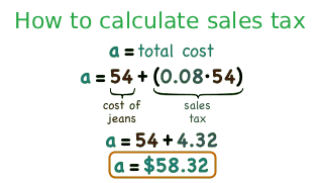
The forward calculation multiplies the net purchase price by the tax rate expressed as a decimal. For a 100 dollar purchase at 8%: $\$100 \times 0.08 = \$8$ in tax, for a total of $\$108$. The reverse calculation recovers the pre-tax amount from a known total: $$\text{Pre-tax Price} = \frac{\text{Total Price}}{1 + (\text{Tax Rate} / 100)}$$ For example, a $108 total at 8% tax gives a pre-tax price of $108 / 1.08 = $100$. A common mistake is simply subtracting 8% from the total (108 - 8.64 = 99.36), which gives the wrong answer because the percentage is being applied to the wrong base.How to Calculate Sales Tax: Forward and Reverse Formula
Useful Tips 💡

  • Check whether your state or municipality has a tax holiday period for specific categories such as clothing, school supplies, or energy-efficient appliances, during which the standard rate does not apply.
  • In many US jurisdictions, shipping and handling fees are taxable when the underlying goods are taxable. Verify your state's rule before assuming shipping is tax-free.

📋Steps to Calculate

  1. Enter the net purchase price or the final total amount (for reverse calculation).

  2. Enter the combined sales tax percentage for your location.

  3. Click "Calculate" to see the tax amount, pre-tax base, and final total broken down separately.

Mistakes to Avoid ⚠️

  1. Using only the state tax rate and ignoring local or district surcharges. In states like California, Tennessee, and Louisiana, the combined local rate can add 2 to 3.5 percentage points above the state base rate.
  2. Applying tax to legally exempt items such as most unprepared groceries, prescription medications, or certain medical equipment. Exemption rules vary significantly by state.
  3. For online purchases, calculating tax based on the billing address rather than the shipping destination. In the US, sales tax nexus rules require tax to be applied based on where the goods are delivered.

Practical Applications📊

  1. Budget accurately for large purchases such as vehicles or electronics by including the combined state and local tax rate before committing to a price.

  2. Verify tax accuracy on business invoices and retail receipts to catch calculation errors or incorrect rate applications.

  3. Separate pre-tax amounts from gross totals for expense reporting, bookkeeping, and annual tax filings.

Questions and Answers

What is a sales tax calculator and how does it work?

A sales tax calculator applies a specified tax rate to a purchase price to determine the tax amount and total cost, or works in reverse to extract the pre-tax base from a known total. It is used by consumers budgeting purchases, businesses verifying invoice accuracy, and accountants separating tax from gross receipts. The forward formula is straightforward: Tax Amount equals Price multiplied by (Rate divided by 100). The reverse formula, which is frequently misunderstood, is: Pre-tax Price equals Total divided by (1 plus Rate divided by 100). The division-based reverse formula is mathematically necessary because tax is calculated on the pre-tax base, not on the total.

What is sales tax and how does it differ from VAT?

Sales tax is a consumption tax collected only at the final point of sale to the end consumer, applied as a percentage of the purchase price. It is the dominant model in the United States, where it is administered at the state and local level with no federal sales tax. Value Added Tax (VAT) is collected at every stage of the production and distribution chain: manufacturer, wholesaler, distributor, and retailer each collect and remit VAT on the value they add. From the consumer's perspective, both result in a higher final price, but VAT is typically included in the displayed price in countries that use it, while US sales tax is added at the point of purchase. GST (Goods and Services Tax), used in Canada, Australia, and India, is structurally similar to VAT.

Can this calculator be used for any region or tax rate?

Yes. The calculator accepts any numeric tax rate, making it applicable to any US state or locality, as well as international VAT and GST rates. Simply enter the combined rate for your specific jurisdiction. In the US, the combined rate is the sum of the state rate, county rate, city rate, and any special district rates. For example, Chicago, Illinois has a combined rate of approximately 10.25%, comprising the Illinois state rate, Cook County rate, Chicago city rate, and a Regional Transportation Authority surcharge. The tool does not pre-load jurisdiction rates, so always verify the current combined rate with your state revenue department or a resource such as the Tax Foundation.

How do I calculate sales tax manually?

For forward calculation: multiply the pre-tax price by the tax rate expressed as a decimal. An 8% rate becomes 0.08, so a $200 item carries $200 times 0.08 equals $16 in tax, for a total of $216. For reverse calculation: divide the total by (1 plus the decimal rate). The same $216 total at 8% gives $216 divided by 1.08 equals $200 pre-tax. The most common manual error is subtracting the percentage directly from the total ($216 minus $17.28 equals $198.72), which is wrong because it applies the percentage to the total rather than to the pre-tax base.

How do I find the pre-tax price from a receipt total?

Use the reverse sales tax formula: Pre-tax Price equals Total Price divided by (1 plus Tax Rate divided by 100). For a receipt showing $53.50 with a 7% tax rate, the pre-tax amount is $53.50 divided by 1.07, which equals $50.00. The tax paid is $53.50 minus $50.00, which equals $3.50. This method is essential for expense reimbursement reports where the taxable base and tax amount must be itemized separately, and for businesses that need to record the net amount for input tax credit purposes.

Is sales tax charged on shipping and handling?

It depends on the jurisdiction and the nature of the goods. In most US states, if the underlying goods being shipped are taxable, the shipping and handling charges are also taxable. However, several states exempt separately stated delivery charges, and some states tax shipping only when it is mandatory rather than optional. For example, California generally taxes shipping when it is not separately stated or when it is a mandatory charge. Always check your specific state's rules, as incorrect treatment of shipping charges is one of the most common sales tax audit findings for e-commerce businesses.

How does sales tax work for vehicle purchases?

Vehicle sales tax is calculated on the purchase price of the vehicle, but many states allow the trade-in value to reduce the taxable base. For example, if you buy a $30,000 vehicle and trade in a vehicle worth $8,000, some states tax only the $22,000 difference rather than the full $30,000. This trade-in credit can produce significant savings: at a 9% combined rate, taxing $22,000 instead of $30,000 saves $720 in tax. Additionally, some states charge a flat registration fee instead of percentage-based sales tax on vehicles, and dealer documentation fees may or may not be included in the taxable amount depending on local rules.

What items are commonly exempt from sales tax?

Exemptions vary significantly by state, but the most common categories include unprepared food and groceries (exempt in most states, though prepared food and restaurant meals are typically taxable), prescription medications (exempt in all US states), over-the-counter medications (exempt in some states), medical devices and equipment (partially or fully exempt in many states), and clothing below a certain value threshold (exempt in states like Pennsylvania, New Jersey, and Minnesota). Agricultural equipment and inputs are exempt in most states to avoid taxing the production of food. Digital goods and software-as-a-service (SaaS) represent an evolving area where exemption rules differ widely and are subject to ongoing legislative changes.
Disclaimer: This calculator is designed to provide helpful estimates for informational purposes. While we strive for accuracy, financial (or medical) results can vary based on local laws and individual circumstances. We recommend consulting with a professional advisor for critical decisions.