Running Pace Calculator
Calculate running pace (min/km or min/mile), average speed, and even split times for any distance - from a 5K to a full marathon - using the relationship Pace = Total Time / Total Distance.
Calculation Examples

How to Use the Pace Calculator
Enter your total distance (in kilometres or miles) and total elapsed time (hours:minutes:seconds). Select your preferred output units (min/km, min/mile, km/h, or mph). Click "Calculate" to receive: your average pace per unit of distance; your average speed; and even split projections - the time you should reach at each kilometre or mile marker to finish on target.
The calculator solves all three variants of the pace equation: given distance and time → pace; given pace and distance → finish time; given pace and time → distance covered. Select the known variables and enter them accordingly.
Pace, Heart Rate, and Training Zones
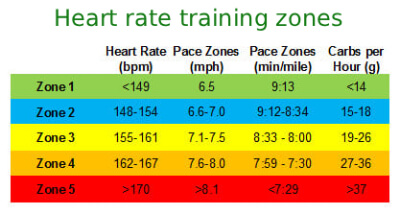
Running pace and heart rate are directly related: as pace increases (faster running), heart rate rises proportionally to meet the increased oxygen demand. For training planning, maximum heart rate (HRmax) is the reference value. The commonly cited formula HRmax = 220 - age (Fox et al., 1971) has a reported standard deviation of ±10-12 bpm and has been shown to underestimate HRmax in adults over 40. A more validated alternative from Tanaka et al. (Journal of the American College of Cardiology, 2001) is: \(\text{HRmax} = 208 - (0.7 \times \text{age})\), based on a meta-analysis of 351 studies involving 18,712 subjects.
Training intensity zones expressed as a percentage of HRmax (American Heart Association definitions): Moderate intensity: 50-70% HRmax; Vigorous intensity: 70-85% HRmax. The commonly referenced "fat-burning zone" (60-70% HRmax) produces the highest proportion of fat as a fuel source, but higher-intensity training at 70-85% burns more total calories per unit of time and may produce greater total fat oxidation in absolute terms. Effective endurance training programs typically include sessions across multiple zones rather than targeting a single zone exclusively.
Useful Tips 💡
- Use moving time (excluding stops at traffic lights or rest breaks) rather than total elapsed time for the most accurate training pace. GPS watches typically report both - use moving time for pace-based training decisions.
- For race finish time prediction, use a pace established in a recent, fully-effort race or time trial rather than an easy training run. Easy runs are typically 60-90 seconds per km slower than race pace and will significantly underestimate your race capability.
📋Steps to Calculate
-
Enter total distance and total elapsed time (H:MM:SS format).
-
Select the output unit: pace in min/km or min/mile; speed in km/h or mph.
-
Click "Calculate" to view pace, speed, finish time projection, and even splits per km or mile.
Mistakes to Avoid ⚠️
- Using total elapsed time from a GPS watch that includes stop time at traffic lights or rest breaks. This inflates time, producing a pace that is slower than your actual running pace. Use the moving time figure if your device separates the two.
- Mixing distance units and pace units: entering a distance in miles but selecting min/km as the output unit - or vice versa - produces a result that is off by the mile-to-km conversion factor (1.60934). Always verify that your input distance unit matches your selected output pace unit.
- Confusing Pace (time per unit distance, e.g., 5:00 min/km) with Speed (distance per unit time, e.g., 12 km/h). They measure the same quantity inversely: Speed (km/h) = 60 / Pace (min/km). A 5:00 min/km pace equals exactly 12.0 km/h.
- Assuming elevation-adjusted pace is the same as flat pace. Running uphill at 5:00 min/km requires significantly more effort than flat running at the same pace. For hilly courses, grade-adjusted pace (GAP), which factors in elevation change, gives a more accurate physiological effort comparison across different terrain.
Practical Applications📊
Race goal setting: enter your goal finish time and race distance to determine the even pace required at every kilometre marker. For a 3:30 marathon (42.195 km), the required even pace is 210 min / 42.195 = 4.976 min/km ≈ 4:59 min/km. Knowing this figure allows you to check your split at each km against a specific target rather than running by feel.
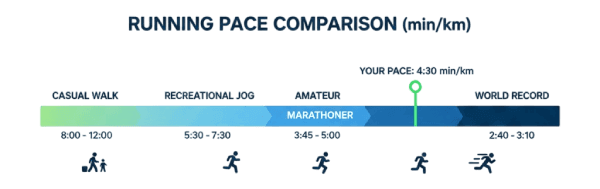
Training pace zones: convert your current race pace to training zone paces. Easy runs (recovery and base building) are typically 60-90 seconds per km slower than 5K race pace; threshold runs are approximately 15-30 seconds per km slower than 10K race pace. The calculator allows you to enter any time and distance to derive these reference paces.
Cross-activity comparison: pace applies to any locomotion activity where elapsed time and distance are measurable - running, walking, cycling, swimming (per 100m), or hiking. Convert between min/km and km/h to compare activities reported in different units, or to assess whether a cycling pace is proportionally consistent with your running pace.