Remainder Calculator
Compute the exact integer quotient and remainder for any division using the Euclidean algorithm.
Calculation Examples

How to Use the Remainder Calculator
Enter the dividend (the number being divided) and the divisor (the number you are dividing by). Both fields accept positive integers, negative integers, and large values. The divisor cannot be zero.
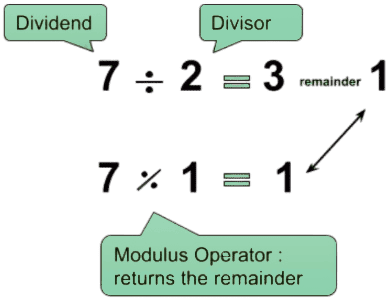
Click Calculate and the tool returns the integer quotient \(q\) and the remainder \(r\), expressed in the form \(a = b \times q + r\). For example, dividing 25 by 7 gives a quotient of 3 and a remainder of 4, since \(25 = 7 \times 3 + 4\). The remainder is always non-negative under the Euclidean definition used here.
How the Euclidean Division Algorithm Works
The calculator is built on the Division Theorem: for any integers \(a\) (dividend) and \(b\) (divisor, \(b \neq 0\)), there exist unique integers \(q\) (quotient) and \(r\) (remainder) satisfying: \[a = b \times q + r, \quad 0 \leq r < |b|\]
The non-negativity constraint on \(r\) is what distinguishes the Euclidean remainder from the raw modulo behavior in some programming languages. In C++ and Java, for instance, \(-7 \% 3\) returns \(-1\) because those languages truncate toward zero. The Euclidean definition always returns \(r \geq 0\), which is the mathematically consistent convention used in number theory and cryptography.
Useful Tips 💡
- A remainder of 0 confirms that the divisor is a factor of the dividend, useful when checking divisibility.
- The remainder is always strictly less than the absolute value of the divisor under the Euclidean definition.
📋Steps to Calculate
-
Enter the dividend (the number being divided).
-
Enter the divisor (must be a non-zero integer).
-
Click Calculate to see the quotient, remainder, and the full division expression.
Mistakes to Avoid ⚠️
- Entering zero as the divisor: division by zero is undefined in all number systems and returns an error.
- Using decimal inputs: the tool is designed for integer arithmetic only.
- Expecting the same negative-remainder behavior as C++ or Java: this calculator uses the Euclidean convention where the remainder is always non-negative.
Practical Applications📊
Test modulo logic in software development for cyclic data structures, hash tables, and parity checks.
Solve congruence problems in number theory and verify integer partitions in academic coursework.
Verify checksum and encryption steps in algorithms that rely on modular arithmetic.