Acceleration Calculator
Calculate Acceleration Using Velocity, Time, or Distance
Calculation Examples

How to Use the Acceleration Calculator
Enter any two known kinematic variables to solve for acceleration. The most common input is initial velocity \((v_i)\), final velocity \((v_f)\), and elapsed time \((t)\). You can also solve using displacement and time, or using force and mass via Newton's Second Law.
Select your units and click "Calculate." The result is expressed in meters per second squared (m/s²), the SI standard unit for acceleration. This tool is designed for physics students, automotive engineers, and sports scientists who need to analyze rates of velocity change accurately.
How the Acceleration Calculator Works
The calculator applies three kinematic formulas depending on which variables are provided. Formula 1, based on velocity and time: \(a = (v_f - v_i) / t\). Formula 2, based on displacement, initial velocity, and time: \(a = 2(d - v_i \times t) / t^2\). Formula 3, based on Newton's Second Law: \(a = F / m\), where \(F\) is net force in Newtons and \(m\) is mass in kilograms.
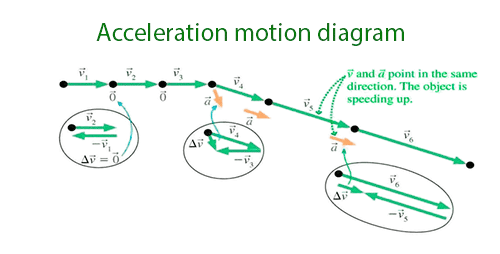
All three are equivalent expressions of the same physical principle. The sign of the result matters: positive acceleration means the object is speeding up in the defined positive direction, while negative acceleration (deceleration) means it is slowing down or accelerating in the opposite direction. Unit consistency is essential: mixing km/h with seconds without conversion is the most common source of incorrect results.
Useful Tips 💡
- Convert all velocity inputs to m/s before calculating. To convert km/h to m/s, divide by 3.6. To convert mph to m/s, multiply by 0.4470.
- Pay attention to the sign of acceleration. Deceleration (slowing down) produces a negative value when the defined positive direction is the direction of initial motion. Entering this correctly is essential for accurate stopping distance and force calculations.
📋Steps to Calculate
-
Enter the initial and final velocity, or displacement and time, or force and mass.
-
Select the correct units for each variable (m/s for velocity, seconds for time, Newtons for force, kilograms for mass).
-
Click "Calculate" to receive the acceleration value in m/s², with the applied formula shown.
Mistakes to Avoid ⚠️
- Using total distance divided by total time instead of change in velocity divided by time. The formula for acceleration is Δv / Δt, not d / t, which gives average speed, not acceleration.
- Entering velocity in km/h without converting to m/s, which understates the acceleration by a factor of 3.6 and produces results in non-standard units.
- Ignoring the sign of acceleration. Deceleration is negative acceleration, not a separate quantity. Treating it as positive leads to incorrect force and energy calculations downstream.
- Confusing average acceleration with instantaneous acceleration. This calculator computes average acceleration over an interval; instantaneous acceleration requires calculus (the derivative of velocity with respect to time).
Practical Applications📊
Evaluate vehicle performance: a car going from 0 to 100 km/h in 10 seconds has an average acceleration of about 2.78 m/s², a common benchmark figure used in automotive reviews and consumer comparisons.
Measure sprint acceleration: a 100m sprinter reaching a top speed of 11 m/s within the first 4 seconds accelerates at an average of about 2.75 m/s² during that phase, a useful benchmark for assessing explosive power.
Analyze braking performance: a car decelerating from 60 km/h to rest in 5 seconds has an average deceleration of about -3.33 m/s², information used to estimate stopping distance and reaction-time margins.
Apply Newton's Second Law in engineering: a 500 kg object pushed by a net force of 1000 N accelerates at exactly 2 m/s², while the same force on a lighter 100 kg object produces 10 m/s², five times more.