Time Until Calculator

Find the exact number of days, hours, minutes, and seconds between now and any future date. Handles leap years and month-length variations automatically.

From
00:00:00
To
00:00:00

Only...

    ...until the final date and time! 🕜📅

    Was this calculator helpful?

    4.6/5 (19 votes)

    Calculation Examples

    Calculation Case Result
    Workday deadline: from 9:00 AM to 5:30 PM same day 8 hours 30 minutes remaining
    Short countdown: how long until 11:55 PM tonight Exact minutes and seconds, updated on each calculation
    Holiday planning: from February 15 to December 25 313 days (or 314 in a leap year — handled automatically)

    How to Use the Time Until Calculator

    Select your target date using the date picker, then specify the exact hour and minute if you need sub-day precision. The calculator reads the current time from your device clock and computes the remaining interval immediately.

    For high-stakes events — a contract deadline, a product launch, an exam start time — always enter the specific time, not just the date. A date-only input defaults to midnight (00:00), which could make your countdown appear 12 or 23 hours off depending on when you check it. If your event is in a different time zone, convert the target time to your local time first, or verify that your device clock is set to the correct zone. The result displays a full breakdown: total days remaining, plus the hours, minutes, and seconds within the final day, updated each time you recalculate.

    The Math Behind Date-Time Calculations

    Counting days between two dates is more complex than simple subtraction because calendar months have unequal lengths (28 to 31 days) and leap years add an extra day every four years (with century-year exceptions under the Gregorian calendar). The calculator eliminates this complexity by working in Unix time: both the current moment and the target date are converted to total milliseconds elapsed since January 1, 1970 (UTC), then subtracted: \[\Delta T = T_{\text{future}} - T_{\text{current}}\] The resulting millisecond difference is then decomposed into human-readable units using fixed factors: \[\text{Days} = \left\lfloor \frac{\Delta T}{86{,}400{,}000} \right\rfloor\] \[\text{Hours} = \left\lfloor \frac{\Delta T \bmod 86{,}400{,}000}{3{,}600{,}000} \right\rfloor\]

    This approach handles leap years, month-length variations, and Daylight Saving Time transitions automatically, because those irregularities are already encoded in the operating system's time libraries that supply the Unix timestamps. No manual calendar lookup is needed. The method is consistent with ISO 8601 date-time arithmetic and is the standard used in software engineering, financial settlement systems, and scientific data logging.
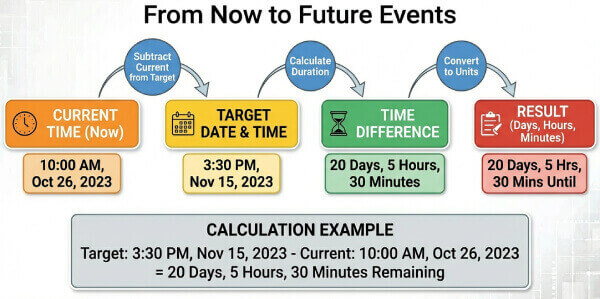
    Time countdown diagram showing decomposition of a future date into days, hours, minutes, and seconds using Unix time arithmetic

    Useful Tips 💡

    • For international events, convert the event's local time to your device's time zone before entering it. A conference starting at 9:00 AM New York time is 14:00 UTC and 17:00 London time — entering the wrong hour produces a multi-hour error in your countdown.
    • Sync your device clock with an internet time server before calculating mission-critical deadlines. Most operating systems do this automatically, but a clock that has drifted even a few minutes will produce a correspondingly inaccurate countdown.
    • For recurring annual events (birthdays, anniversaries), always verify the target year in the date picker. The most common error is inadvertently counting down to a past date in the current or previous year.

    📋Steps to Calculate

    1. Select the target date using the calendar picker.

    2. Enter the exact time (hours and minutes) for sub-day precision. Leaving this blank defaults to midnight.

    3. Click Calculate to see the full breakdown: days, hours, minutes, and seconds remaining.

    4. Recalculate at any point to get a fresh reading based on the current moment.

    Mistakes to Avoid ⚠️

    1. Entering the date without a time and assuming the countdown starts from now rather than from midnight of the target day. This creates an error of up to 23 hours and 59 minutes.
    2. Confusing 12:00 AM (midnight, start of day) with 12:00 PM (noon). An event at noon entered as 12:00 AM produces a 12-hour error in the countdown.
    3. Ignoring Daylight Saving Time: if your target date falls after a DST transition and your current date is before it, the actual elapsed time differs from a naive hour-count by one hour.
    4. Selecting the correct month and day but the wrong year, most commonly when an annual event is still months away and the next occurrence is in the following year.

    Practical Applications📊

    1. Project and deadline management: Track the exact days and hours remaining to a contract delivery, regulatory filing, or sprint milestone.

    2. Event planning: Count down to a wedding, conference, academic exam, or product launch with hour-level precision.

    3. Financial and legal timing: Calculate the days until a bond matures, a lease expires, a statute of limitations runs, or a payment is due.

    4. Personal goals: Visualize the time remaining until a vacation, a fitness milestone, or a significant personal date to maintain motivation and planning discipline.

    Questions and Answers

    What is a time until calculator and why is it useful?

    A time until calculator computes the exact interval between the current moment and a specified future date and time, expressed as days, hours, minutes, and seconds. Manual day-counting is error-prone because calendar months have unequal lengths, leap years add irregular days, and Daylight Saving Time shifts wall-clock time by an hour. A dedicated calculator eliminates all three sources of error by working in Unix time, which encodes all calendar irregularities automatically.

    How does this calculator handle leap years and different month lengths?

    The calculator converts both dates to Unix timestamps (milliseconds since January 1, 1970, UTC), subtracts them, and decomposes the result into days, hours, and minutes. Because the operating system's time libraries already encode all Gregorian calendar rules — including the leap year rule (divisible by 4, except centuries unless divisible by 400) — the calculation handles February 29 and variable month lengths without any manual adjustment. A countdown spanning February of a leap year automatically includes the extra day.

    Can I calculate the exact hours until a specific deadline?

    Yes. Enter the deadline date and the exact time (hour and minute). The calculator returns the total remaining time decomposed into days, hours, minutes, and seconds. For example, if it is currently 10:30 AM and your deadline is 3:00 PM the same day, the result is 4 hours 30 minutes. If the deadline is tomorrow at 9:00 AM, the result accounts for the full overnight interval including any DST transition that occurs between now and then.

    How do I find out how long until a specific time today, like 4:00 PM?

    Leave the date set to today and enter 16:00 (4:00 PM) in the time field. The calculator subtracts the current time from 16:00 and returns the remaining hours and minutes. If the target time has already passed today, increment the date to tomorrow to get the forward-looking countdown. The tool always calculates the interval to the future, not backward.

    Does the countdown update in real time?

    The calculator produces a precise snapshot of the remaining time at the moment you click Calculate. It does not automatically tick down like a live clock. To get an updated reading, click Calculate again. For a continuously updating countdown display, most operating systems and browsers offer built-in clock widgets, or you can use a dedicated countdown app that refreshes the display every second.

    How do I calculate time until an event in a different time zone?

    Convert the event's start time to your local time zone before entering it. For example, if a webinar starts at 2:00 PM Eastern Time (ET) and you are in London (BST, UTC+1 in summer), the local equivalent is 7:00 PM. Enter 19:00 as the target time. Alternatively, temporarily change your device's time zone to the event location, calculate, then change it back. This method works because the calculator always reads the current time from your device clock.

    What formula does this calculator use for the countdown?

    The calculation follows ISO 8601 duration arithmetic using Unix time. Both moments are converted to milliseconds since the Unix epoch (January 1, 1970, 00:00:00 UTC): \[\Delta T = T_{\text{target}} - T_{\text{now}}\] Days are extracted using integer division: \[\text{Days} = \left\lfloor \Delta T \div 86{,}400{,}000 \right\rfloor\] Remaining hours, minutes, and seconds are extracted using the modulo operation on the residual milliseconds. This is the standard method used in calendar software, financial settlement systems, and legal date-counting applications.
    Disclaimer: This calculator is designed to provide helpful estimates for informational purposes. While we strive for accuracy, financial (or medical) results can vary based on local laws and individual circumstances. We recommend consulting with a professional advisor for critical decisions.