Time Calculator
Add or subtract hours, minutes, and seconds, or find the exact duration between two clock times - with correct 24-hour rollover, sexagesimal arithmetic, and conversion between H:MM:SS and total seconds.
Calculation Examples

How to Use the Time Calculator
To add or subtract time: enter a starting time and the hours, minutes, or seconds you wish to add or subtract. To find duration between two times: enter the start time and end time. Click "Calculate" to see the result in hours:minutes:seconds format and as a total in seconds.
The calculator handles the 24-hour rollover automatically - adding 3 hours to 11:00 PM returns 2:00 AM (the next day), not 14:00 PM. For work-hour calculations where times cross midnight (e.g., a shift from 10:00 PM to 6:00 AM), the duration is computed correctly as 8 hours by treating the end time as belonging to the following calendar day.
How Time Measurement Works
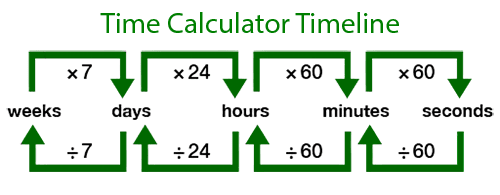
The division of time into hours, minutes, and seconds is based on the sexagesimal (base-60) number system originating in Babylonian mathematics around 2000 BCE. The Babylonians used base-60 because 60 is highly divisible - it has 12 factors (1, 2, 3, 4, 5, 6, 10, 12, 15, 20, 30, 60), making it convenient for fractional division. The ancient Greek astronomer Hipparchus (2nd century BCE) applied this system to divide the day into 24 hours and the hour into 60 minutes; the further division of minutes into 60 seconds was formalized in medieval Islamic astronomy.
This sexagesimal structure means time arithmetic is non-decimal and requires careful handling at unit boundaries: 90 seconds = 1 minute and 30 seconds (not 1.5 minutes in H:MM:SS notation); 75 minutes = 1 hour and 15 minutes. The calculator converts all inputs to a total in seconds ($T_{total} = (h \times 3600) + (m \times 60) + s$) before performing arithmetic and converts back to H:MM:SS format using modular division: $h_{final} = \lfloor T_{total} / 3600 \rfloor$, $m_{final} = \lfloor (T_{total} \bmod 3600) / 60 \rfloor$, $s_{final} = T_{total} \bmod 60$.
Useful Tips 💡
- When entering times in 12-hour format, always specify AM or PM. 12:00 PM (noon) and 12:00 AM (midnight) are the most frequently confused: 12:00 AM is the start of a new day (midnight), while 12:00 PM is midday. Use 24-hour format (00:00 for midnight, 12:00 for noon) to eliminate this ambiguity entirely.
- For multi-shift payroll calculations, add each shift's duration separately rather than converting all start/end times to decimals. Decimal hours introduce rounding at each conversion step; working in H:MM:SS throughout and converting once at the end minimizes accumulated error.
📋Steps to Calculate
-
Select the operation: Add Time, Subtract Time, or Find Duration between two times.
-
Enter the starting time (or first time for duration) in hours, minutes, and seconds.
-
Enter the time to add/subtract, or the end time for duration calculation.
-
Click "Calculate" to see the result in H:MM:SS and in total seconds.
Mistakes to Avoid ⚠️
- Confusing clock time with duration. "2:30 PM" is a point in time; "2 hours 30 minutes" is a duration. Entering a clock time into a duration field (or vice versa) produces incorrect results. The calculator uses separate input fields to make this distinction explicit.
- Forgetting the midnight rollover in 12-hour format. Adding 4 hours to 10:00 PM produces 2:00 AM the following day - not 14:00. The calculator handles this automatically, but manual hour addition often produces "14 PM" as an invalid result.
- Subtracting a later start time from an earlier end time without accounting for the day boundary. A shift from 10:00 PM to 6:00 AM is 8 hours, not −16 hours. Treat the end time as belonging to the next calendar day when the end time (in 24-hour terms) is earlier than the start time.
Practical Applications📊
Payroll and work-hour calculation: total the hours worked across multiple shifts, then verify against the scheduled hours. For shifts crossing midnight (e.g., 22:00–06:00), the calculator correctly returns 8:00 duration without requiring manual day-boundary adjustment.
Project management and scheduling: sum task durations to find total project time, or subtract current elapsed time from the total budget to find remaining time. Convert the result to total minutes or hours for integration with scheduling tools that use decimal hours.
Sports and training: calculate pace-based time targets (e.g., time to run a specific distance at a known pace), total training volume in time, or the exact split between two recorded checkpoint times from a GPS watch.