Average Calculator

Find the arithmetic mean of any set of numbers. Enter values separated by commas or spaces and see the sum, count, and step-by-step calculation instantly.

Enter numbers separated by commas or spaces.

Was this calculator helpful?

4.9/5 (19 votes)

Calculation Examples

Calculation Case Result
Average of two numbers: 76 and 100 Mean = 88
Grade average: 85, 92, 78, 95 Mean = 87.5
Dataset with negative value: 10, -5, 20, 15 Mean = 10
Average of 96 and 100 Mean = 98

How to Use the Average Calculator

Type or paste your numbers into the input field, separated by commas, spaces, or line breaks. The calculator accepts positive integers, negative values, and decimals. Click Calculate to see three results immediately: the arithmetic mean, the total sum of all values, and the count of numbers entered.

The sum and count are shown alongside the mean so you can verify the calculation yourself: divide the sum by the count and you get the mean. This transparency is useful when checking a grade average, auditing a financial data set, or teaching a student how the formula works. For grade averaging specifically, note that this tool computes an unweighted mean — all values contribute equally. If your school weights assignments differently (e.g., finals count double), you need a weighted average calculation, which multiplies each score by its weight before summing.

How to Calculate the Average: Formula and Steps

In mathematics and statistics, "average" most commonly refers to the arithmetic mean: the sum of all values divided by the count of values. The formula is: \[\bar{x} = \frac{1}{n}\sum_{i=1}^{n}x_i = \frac{x_1 + x_2 + \cdots + x_n}{n}\] where \(\bar{x}\) is the mean, \(n\) is the number of values, and \(x_i\) represents each individual value.

For example, to find the average of 4, 8, and 12: sum = \(4 + 8 + 12 = 24\), count = 3, mean = \(24 / 3 = 8\). The arithmetic mean has one important sensitivity: it responds to every value in the set, including outliers. A single extreme value pulls the mean toward it. For the set \{10, 10, 10, 100\}, the mean is 32.5 — which does not resemble any of the actual values. In such cases, the median (the middle value in sorted order, here 10) is a more representative measure of central tendency. The calculator computes the arithmetic mean; if your data has significant outliers, consider whether the mean is the most appropriate statistic for your purpose.
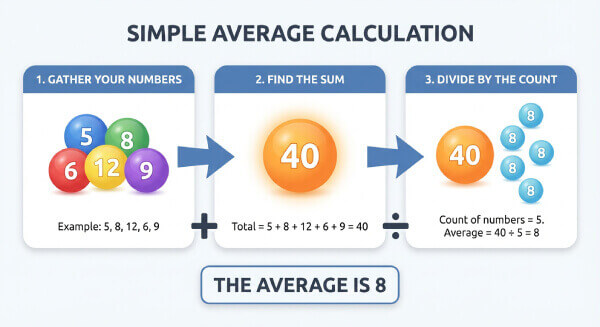
Step-by-step arithmetic mean calculation example: four numbers summed then divided by count to produce the average

Useful Tips 💡

  • Use a period (.) as the decimal separator, not a comma. If your locale uses commas for decimals, convert them before entering (e.g., write 3.14, not 3,14).
  • Before using a simple arithmetic mean, check whether your data needs a weighted average instead. If a final exam is worth 40% of your grade and quizzes are worth 10% each, a simple average of all scores will give a misleading result.
  • To average just two numbers quickly: add them and divide by 2. For 76 and 100: \((76 + 100) / 2 = 88\).

📋Steps to Calculate

  1. Enter your numbers separated by commas, spaces, or line breaks.

  2. Check that no letters, currency symbols, or extra punctuation are included.

  3. Click Calculate to see the mean, total sum, and count of values.

Mistakes to Avoid ⚠️

  1. Including non-numeric characters (currency signs, percent symbols, letters) in the input: the parser treats them as invalid and may exclude the value or return an error, silently changing your count.
  2. Using a simple average for data that requires a weighted average: if a 100-point final and a 10-point quiz are averaged equally, the quiz has ten times more influence per point than it should.
  3. Ignoring outliers: a single extreme value can shift the mean dramatically. For the dataset of five, six, five, five, and one hundred, the mean is 24 despite four of the five values being near five. Always inspect your data visually before interpreting the mean.
  4. Forgetting to update the input when new data arrives: the mean of scores entered last month does not automatically include new scores. Re-enter the full updated list each time.

Practical Applications📊

  1. Academic grade tracking: Find the unweighted average across multiple test scores, quizzes, or assignments to track progress toward a target grade.

  2. Business and finance: Calculate average monthly revenue, average order value (AOV), average daily expenses, or average transaction size from a list of figures.

  3. Sports statistics: Compute mean scores, race times, batting averages, or performance metrics across a season or training block.

  4. Science and data analysis: Find the mean of repeated experimental measurements to reduce the effect of random error and obtain a best estimate of the true value.

Questions and Answers

What is an average calculator?

An average calculator computes the arithmetic mean of a set of numbers: it sums all values and divides by the count. It is the most commonly used measure of central tendency in statistics, finance, education, and science. The tool is useful any time you need a single representative value for a collection of numbers — a class average, a monthly revenue mean, or the average of repeated measurements in an experiment.

How do you find the average of a set of numbers?

Add all the numbers together to get the sum, then divide by how many numbers there are: \(\bar{x} = S / n\). For the set \{10, 20, 30\}: sum = 60, count = 3, mean = 20. For the set \{7, 14, 3, 22, 9\}: sum = 55, count = 5, mean = 11. The formula is the same regardless of how many values you have — the calculator handles sets from 2 to several thousand numbers.

How can I calculate my average grade?

Enter all your scores separated by commas and click Calculate. For example: 85, 92, 78, 95 gives a sum of 350 and a mean of 87.5. This works correctly when all assessments carry equal weight. If your course uses weighted grades — for example, homework counts 20%, midterm 30%, final 50% — multiply each score by its weight before averaging: \((85 \times 0.2) + (78 \times 0.3) + (92 \times 0.5) = 17 + 23.4 + 46 = 86.4\). The simple average calculator handles the unweighted case; for weighted grades, use a dedicated weighted average tool.

How do I find the average of two numbers?

Add them and divide by 2: \(\bar{x} = (a + b) / 2\). For 76 and 100: \((76 + 100) / 2 = 88\). This is the arithmetic midpoint between the two values and is equivalent to the general mean formula applied to a two-element set. It also corresponds to linear interpolation at the halfway point between the two numbers.

How do I calculate the average of a large data set?

Paste the full list of numbers into the input field, using commas or line breaks as separators. You can copy a column of values directly from a spreadsheet (Excel, Google Sheets) and paste it into the calculator — the parser handles line-break-separated values. The calculator returns the mean, total sum, and count simultaneously, giving you enough information to verify the result or use it in further calculations.

What is the difference between mean, median, and mode?

All three describe the center of a dataset but in different ways. The arithmetic mean sums all values and divides by count — it is sensitive to every value including outliers. The median is the middle value when data is sorted — it is robust to outliers and better represents typical values in skewed distributions (e.g., income data). The mode is the most frequently occurring value — useful for categorical data and identifying common outcomes. For a symmetric, outlier-free distribution, all three coincide. For skewed data, the median is usually more informative than the mean.

What formula does the average calculator use?

The calculator applies the arithmetic mean formula: \[\bar{x} = \frac{1}{n}\sum_{i=1}^{n}x_i\] where \(n\) is the count of values and \(x_i\) represents each individual value. This is the standard definition of arithmetic mean in descriptive statistics, consistent with ISO 3534-1 (Statistics — Vocabulary and Symbols) and universally used in educational and professional statistical analysis.

How do outliers and zero values affect the mean?

Zero is a valid data point that reduces the mean: it increases the count \(n\) without adding to the sum \(S\), so \(\bar{x} = S/n\) decreases. For example, adding a score of 0 to \{80, 90, 100\} changes the mean from 90 to 67.5. Outliers — values far above or below the rest — pull the mean in their direction. In the set \{5, 5, 5, 5, 500\}, the mean is 104 despite four of five values being 5. When outliers are present, the median (5 in this case) is typically a more accurate representation of the typical value. Always check whether any values in your dataset are errors before computing the mean.
Disclaimer: This calculator is designed to provide helpful estimates for informational purposes. While we strive for accuracy, financial (or medical) results can vary based on local laws and individual circumstances. We recommend consulting with a professional advisor for critical decisions.